# Animator

### Description

An Animator [OverNode](/over-sdk-manual/over-visual-scripting-legacy/visual-scripting-essentials/overnode.md) is used to handle animations by interacting with the Unity [Animator](https://docs.unity3d.com/ScriptReference/Animator.html) Component.

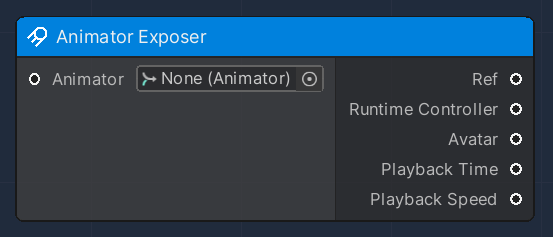
#### Animator Exposer

This node is used to expose the parameters and attributes of a given input Unity [Animator](https://docs.unity3d.com/ScriptReference/Animator.html) component, which are:

<table><thead><tr><th>Name</th><th width="237.3279424240331">Type</th><th width="340.1572968009442">Description</th></tr></thead><tbody><tr><td>Ref</td><td><a href="https://docs.unity3d.com/ScriptReference/Animator.html">Animator</a></td><td>A reference of the input Unity Animator Component</td></tr><tr><td>RuntimeController</td><td><a href="https://docs.unity3d.com/ScriptReference/RuntimeAnimatorController.html">RuntimeAnimatorController</a></td><td>Unity RuntimeController associated to the Animator</td></tr><tr><td>Avatar</td><td><a href="https://docs.unity3d.com/ScriptReference/Avatar.html">Avatar</a></td><td>Unity Avatar associated to the Animator</td></tr><tr><td>Playback Time</td><td>Float</td><td>The playback position in the recording buffer</td></tr><tr><td>Playback Speed</td><td>Float</td><td><p>The playback speed of the Animator. </p><p>One is the normal playback speed.</p></td></tr></tbody></table>

<figure><img src="/files/F8GDc3AsLcC4OYMOiXDz" alt=""><figcaption></figcaption></figure>

#### Play Animator

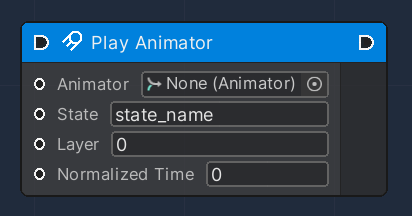
This node is used to play a specific state, defined by a `String`.

When you specify a state name, or the string used to generate a hash, it should include the name of the parent layer. For example, if you have a `Bounce` state in the `Base Layer`, the name is `Base Layer.Bounce`.

The `normalizedTime` parameter varies between 0 and 1, representing the starting point of the Play Animator.

This Flow Node accepts the following input data:

<table><thead><tr><th width="205.7659040188865">Name</th><th width="196.3279424240331">Type</th><th width="340.1572968009442">Description</th></tr></thead><tbody><tr><td>Animator</td><td><a href="https://docs.unity3d.com/ScriptReference/Animator.html">Animator</a></td><td>A reference of the input Unity Animator Component</td></tr><tr><td>State</td><td>String</td><td>Name of the State to be played</td></tr><tr><td>Layer</td><td>Integer</td><td>The layer index. If layer is -1, it plays the first state with the given state name or hash.</td></tr><tr><td>Normalized Time</td><td>Float</td><td>The time offset between zero and one.</td></tr></tbody></table>

<figure><img src="/files/ykHbd4sxrGU0QDu547W5" alt=""><figcaption></figcaption></figure>

#### Set Bool

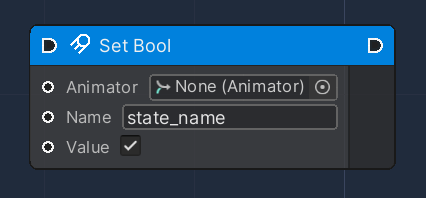
This node is used to set the value of the given boolean parameter, to cause transitions between Animator states.

This Flow Node accepts the following input data:

<table><thead><tr><th width="205.7659040188865">Name</th><th width="196.3279424240331">Type</th><th width="340.1572968009442">Description</th></tr></thead><tbody><tr><td>Animator</td><td><a href="https://docs.unity3d.com/ScriptReference/Animator.html">Animator</a></td><td>A reference of the input Unity Animator Component</td></tr><tr><td>Name</td><td>String</td><td>Boolean Parameter Name to be set</td></tr><tr><td>Value</td><td>Boolean</td><td>Boolean Parameter Value to be set</td></tr></tbody></table>

<figure><img src="/files/lybRwTRZBexUT1GmaRjl" alt=""><figcaption></figcaption></figure>

#### Set Float

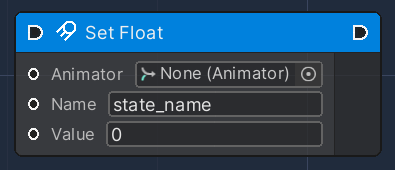
This node is used to set the value of the given float parameter, to cause transitions between Animator states.

This Flow Node accepts the following input data:

<table><thead><tr><th width="205.7659040188865">Name</th><th width="196.3279424240331">Type</th><th width="340.1572968009442">Description</th></tr></thead><tbody><tr><td>Animator</td><td><a href="https://docs.unity3d.com/ScriptReference/Animator.html">Animator</a></td><td>A reference of the input Unity Animator Component</td></tr><tr><td>Name</td><td>String</td><td>Float Parameter Name to be set</td></tr><tr><td>Value</td><td>Float</td><td>Float Parameter Value to be set</td></tr></tbody></table>

<figure><img src="/files/r9lin2b1xodluOaHkG0r" alt=""><figcaption></figcaption></figure>

#### Set Trigger

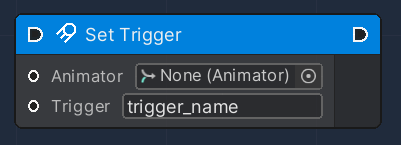
This node is used to set (i.e. activate) an animation trigger, to cause a change in flow in the state machine of an animator controller.

Unlike `bool`s which have the same `true/false` option, `Trigger`s have a `true` option which automatically returns back to `false`.

This Flow Node accepts the following input data:

<table><thead><tr><th width="205.7659040188865">Name</th><th width="196.3279424240331">Type</th><th width="340.1572968009442">Description</th></tr></thead><tbody><tr><td>Animator</td><td><a href="https://docs.unity3d.com/ScriptReference/Animator.html">Animator</a></td><td>A reference of the input Unity Animator Component</td></tr><tr><td>Trigger</td><td>String</td><td>Trigger Parameter to be set</td></tr></tbody></table>

<figure><img src="/files/r03R6OydZaYFegRgmYIL" alt=""><figcaption></figcaption></figure>

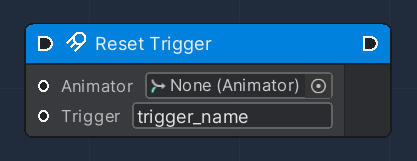
#### Reset Trigger

This node is used to reset the value of an animation trigger, in case a Trigger parameter could still be active.

This Flow Node accepts the following input data:

<table><thead><tr><th width="205.7659040188865">Name</th><th width="196.3279424240331">Type</th><th width="340.1572968009442">Description</th></tr></thead><tbody><tr><td>Animator</td><td><a href="https://docs.unity3d.com/ScriptReference/Animator.html">Animator</a></td><td>A reference of the input Unity Animator Component</td></tr><tr><td>Trigger</td><td>String</td><td>Trigger Parameter to be reset</td></tr></tbody></table>

<figure><img src="/files/YRxkBMS0nWBIjugk6M3Q" alt=""><figcaption></figcaption></figure>

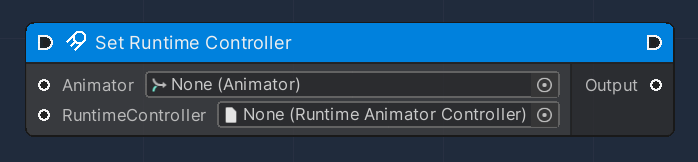
#### Set Runtime Controller

This node is used to modify an existing Animator Component, by setting a new [RuntimeController](https://docs.unity3d.com/ScriptReference/RuntimeAnimatorController.html).

This Flow Node accepts the following input data:

<table><thead><tr><th width="184.7659040188865">Name</th><th width="238.3279424240331">Type</th><th width="340.1572968009442">Description</th></tr></thead><tbody><tr><td>Animator</td><td><a href="https://docs.unity3d.com/ScriptReference/Animator.html">Animator</a></td><td>A reference of the input Unity Animator Component</td></tr><tr><td>RuntimeController</td><td><a href="https://docs.unity3d.com/ScriptReference/RuntimeAnimatorController.html">RuntimeAnimatorController</a></td><td>RuntimeController to be set</td></tr></tbody></table>

and produces the following output data:

<table><thead><tr><th width="186.7659040188865">Name</th><th width="207.3279424240331">Type</th><th width="340.1572968009442">Description</th></tr></thead><tbody><tr><td>Output</td><td><a href="https://docs.unity3d.com/ScriptReference/Animator.html">Animator</a></td><td>A reference of the modified Unity Animator Component</td></tr></tbody></table>

<figure><img src="/files/Ykti4i3Qpt7PRjXeMe7u" alt=""><figcaption></figcaption></figure>

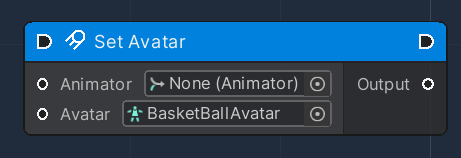
#### Set Avatar

This node is used to modify an existing Animator Component, by setting a new [Avatar](https://docs.unity3d.com/ScriptReference/Avatar.html).

This Flow Node accepts the following input data:

<table><thead><tr><th width="186.7659040188865">Name</th><th width="212.3279424240331">Type</th><th width="340.1572968009442">Description</th></tr></thead><tbody><tr><td>Animator</td><td><a href="https://docs.unity3d.com/ScriptReference/Animator.html">Animator</a></td><td>A reference of the input Unity Animator Component</td></tr><tr><td>Avatar</td><td><a href="https://docs.unity3d.com/ScriptReference/Avatar.html">Avatar</a></td><td>Avatar to be set.</td></tr></tbody></table>

and produces the following output data:

<table><thead><tr><th width="186.7659040188865">Name</th><th width="207.3279424240331">Type</th><th width="340.1572968009442">Description</th></tr></thead><tbody><tr><td>Output</td><td><a href="https://docs.unity3d.com/ScriptReference/Animator.html">Animator</a></td><td>A reference of the modified Unity Animator Component</td></tr></tbody></table>

<figure><img src="/files/bi2c4minM71NkRZD2ih5" alt=""><figcaption></figcaption></figure>


---

# Agent Instructions: Querying This Documentation

If you need additional information that is not directly available in this page, you can query the documentation dynamically by asking a question.

Perform an HTTP GET request on the current page URL with the `ask` query parameter:

```
GET https://docs.overthereality.ai/over-sdk-manual/over-visual-scripting-legacy/nodes/components/animator.md?ask=<question>
```

The question should be specific, self-contained, and written in natural language.
The response will contain a direct answer to the question and relevant excerpts and sources from the documentation.

Use this mechanism when the answer is not explicitly present in the current page, you need clarification or additional context, or you want to retrieve related documentation sections.