# Navigation

### Description

Collection of [OverNode](/over-sdk-manual/over-visual-scripting-legacy/visual-scripting-essentials/overnode.md) used to interact with Unity's [NavMeshAgent](https://docs.unity3d.com/ScriptReference/AI.NavMeshAgent.html)

#### NavMeshAgent Exposer

<figure><img src="/files/5yZryXeI5RMBolqokfIC" alt=""><figcaption><p>NavMeshAgent node</p></figcaption></figure>

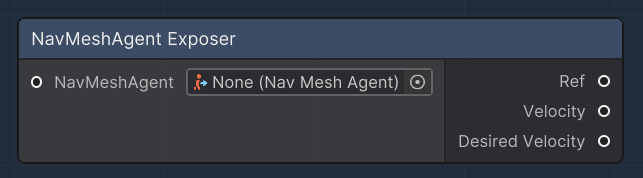
The "NavMeshAgent Exposer" node is designed to provide access to various properties of a NavMeshAgent component. This node allows for the retrieval of the reference to the NavMeshAgent, as well as its current velocity and desired velocity. It is particularly useful for AI scripting in Unity, allowing for decision-making based on the movement and intended path of an agent.

<table><thead><tr><th width="205.7659040188865">Name</th><th width="194.3279424240331">Type</th><th width="340.1572968009442">Description</th></tr></thead><tbody><tr><td>NavMeshAgent</td><td><a href="https://docs.unity3d.com/ScriptReference/AI.NavMeshAgent.html">NavMeshAgent</a></td><td>An input slot that accepts a NavMeshAgent component from which data will be exposed.</td></tr><tr><td>Ref</td><td><a href="https://docs.unity3d.com/ScriptReference/AI.NavMeshAgent.html">NavMeshAgent</a></td><td>An output slot that provides the reference to the input NavMeshAgent.</td></tr><tr><td>Velocity</td><td>Vector3</td><td>An output slot that provides the current velocity of the NavMeshAgent.</td></tr><tr><td>Desired Velocity</td><td>Vector3</td><td>An output slot that provides the desired velocity of the NavMeshAgent, representing its intended movement direction and speed.</td></tr></tbody></table>

**Set Destination**

<figure><img src="/files/HrmQfPFidujlaXPX04NN" alt=""><figcaption><p>Set Destination node</p></figcaption></figure>

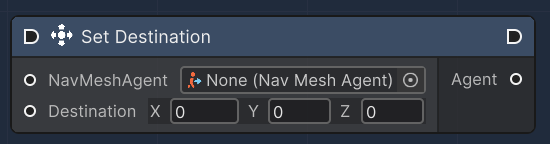
The "Set Destination" node commands a NavMeshAgent to move to a specified location. It takes a NavMeshAgent and a Vector3 destination as inputs. When executed, the node sets the agent's destination to the provided Vector3 coordinates. This node is essential for directing AI characters or objects within a scene, allowing them to navigate to target positions.

<table><thead><tr><th width="205.7659040188865">Name</th><th width="194.3279424240331">Type</th><th width="340.1572968009442">Description</th></tr></thead><tbody><tr><td>NavMeshAgent</td><td><a href="https://docs.unity3d.com/ScriptReference/AI.NavMeshAgent.html">NavMeshAgent</a></td><td>An input slot that accepts a NavMeshAgent component which will be directed to a new destination.</td></tr><tr><td>Destination</td><td>Vector3</td><td>An input slot for the Vector3 coordinates that the NavMeshAgent will be directed to move towards.</td></tr><tr><td>Agent</td><td><a href="https://docs.unity3d.com/ScriptReference/AI.NavMeshAgent.html">NavMeshAgent</a></td><td>An output slot that provides the NavMeshAgent reference after its destination has been set.</td></tr></tbody></table>

**Warp To**

<figure><img src="/files/wOGmpuUQrpAwjxi9WWmY" alt=""><figcaption><p>Warp To node</p></figcaption></figure>

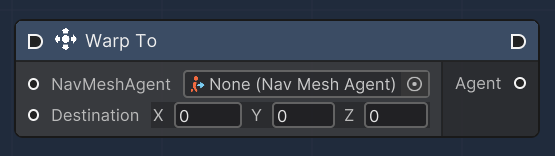
The "Warp To" node instantly moves a NavMeshAgent to a specified location without taking into account the NavMesh. It is used to teleport the agent to a new position, which can be useful for initializing positions, respawning, or any other case where an instant change in location is required. The node receives a NavMeshAgent and the target Vector3 destination as inputs, and upon execution, it warps the agent to the given coordinates.

<table><thead><tr><th width="205.7659040188865">Name</th><th width="194.3279424240331">Type</th><th width="340.1572968009442">Description</th></tr></thead><tbody><tr><td>NavMeshAgent</td><td><a href="https://docs.unity3d.com/ScriptReference/AI.NavMeshAgent.html">NavMeshAgent</a></td><td>An input slot that accepts a NavMeshAgent component that will be teleported.</td></tr><tr><td>Destination</td><td>Vector3</td><td>An input slot for the Vector3 coordinates to which the NavMeshAgent will be teleported.</td></tr><tr><td>Agent</td><td><a href="https://docs.unity3d.com/ScriptReference/AI.NavMeshAgent.html">NavMeshAgent</a></td><td>An output slot that provides the NavMeshAgent reference after it has been warped to the new destination.</td></tr></tbody></table>

**Move Agent**

<figure><img src="/files/C5trkEh7rlcdqGMaIDct" alt=""><figcaption><p>Move Agent Node</p></figcaption></figure>

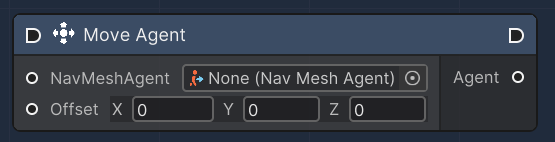
The "Move Agent" node controls a NavMeshAgent's movement by specifying an offset from its current position. This node takes in a NavMeshAgent and a Vector3 offset as inputs. When executed, the node moves the agent by the offset amount, which can be used for incremental movement or for applying forces such as knockback or sliding.

<table><thead><tr><th width="205.7659040188865">Name</th><th width="194.3279424240331">Type</th><th width="340.1572968009442">Description</th></tr></thead><tbody><tr><td>NavMeshAgent</td><td><a href="https://docs.unity3d.com/ScriptReference/AI.NavMeshAgent.html">NavMeshAgent</a></td><td>An input slot that accepts a NavMeshAgent component to be moved.</td></tr><tr><td>Offset</td><td>Vector3</td><td>An input slot for the Vector3 offset by which the NavMeshAgent will be moved.</td></tr><tr><td>Agent</td><td><a href="https://docs.unity3d.com/ScriptReference/AI.NavMeshAgent.html">NavMeshAgent</a></td><td>An output slot that provides the NavMeshAgent reference after the move operation has been executed.</td></tr></tbody></table>


---

# Agent Instructions: Querying This Documentation

If you need additional information that is not directly available in this page, you can query the documentation dynamically by asking a question.

Perform an HTTP GET request on the current page URL with the `ask` query parameter:

```
GET https://docs.overthereality.ai/over-sdk-manual/over-visual-scripting-legacy/nodes/components/navigation.md?ask=<question>
```

The question should be specific, self-contained, and written in natural language.
The response will contain a direct answer to the question and relevant excerpts and sources from the documentation.

Use this mechanism when the answer is not explicitly present in the current page, you need clarification or additional context, or you want to retrieve related documentation sections.