# Rigidbody

### Description

A Rigidbody [OverNode](/over-sdk-manual/over-visual-scripting-legacy/visual-scripting-essentials/overnode.md) is used to control an object's position through physics simulation, by interacting with the Unity [Rigidbody](https://docs.unity3d.com/ScriptReference/Rigidbody.html) Component.

{% hint style="info" %}
**Note:** Adding a Rigidbody component to an object will put its motion under the control of Unity's physics engine.
{% endhint %}

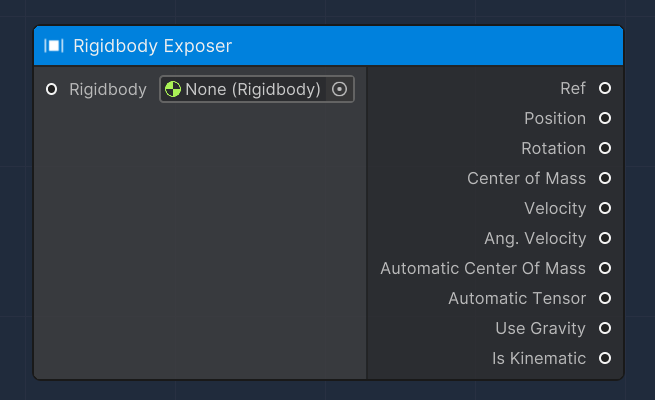
#### Rigidbody Exposer

This [OverNode](/over-sdk-manual/over-visual-scripting-legacy/visual-scripting-essentials/overnode.md) is used to expose certain parameters and attributes of a given input Unity [Rigidbody](https://docs.unity3d.com/ScriptReference/Rigidbody.html) Component, which are:

<table><thead><tr><th>Name</th><th width="204.3279424240331">Type</th><th width="340.1572968009442">Description</th></tr></thead><tbody><tr><td>Ref</td><td><a href="https://docs.unity3d.com/ScriptReference/Rigidbody.html">Rigidbody</a></td><td>A reference of the input Unity Rigidbody Component</td></tr><tr><td>Position</td><td>Vector3</td><td>The world space position of the Rigidbody </td></tr><tr><td>Rotation</td><td>Quaternion</td><td>The world space rotation of the Rigidbody </td></tr><tr><td>Center of Mass</td><td>Vector3</td><td>The center of mass relative to the Transform's origin.</td></tr><tr><td>Velocity</td><td>Vector3</td><td>The velocity vector of the Rigidbody. It represents the rate of change of Rigidbody position.</td></tr><tr><td>Ang. Velocity</td><td>Vector3</td><td>The angular velocity vector of the Rigidbody is measured in radians per second.</td></tr><tr><td>Automatic Center Of Mass</td><td>bool</td><td>Whether or not to calculate the center of mass automatically.</td></tr><tr><td>Automatic Tensor</td><td>bool</td><td>Whether or not to calculate the inertia tensor automatically.</td></tr><tr><td>Use Gravity</td><td>bool</td><td>Controls whether gravity affects this rigidbody.</td></tr><tr><td>Is Kinematic</td><td>bool</td><td>Controls whether physics affects the rigidbody.</td></tr></tbody></table>

<figure><img src="/files/L1JfNrMDfRs8Xw11onIp" alt=""><figcaption></figcaption></figure>

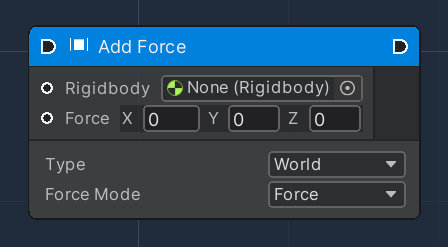
#### Add Force

This [OverNode](/over-sdk-manual/over-visual-scripting-legacy/visual-scripting-essentials/overnode.md) adds a force to the Rigidbody.&#x20;

Force is applied along the direction of the `force` vector. Specifying the [ForceMode](https://docs.unity3d.com/ScriptReference/ForceMode.html) `mode` allows the type of force to be changed to an Acceleration, Impulse or Velocity Change.

The `Type` parameter allows for the application of the force relative to its coordinate system or not.

This Flow [OverNode](/over-sdk-manual/over-visual-scripting-legacy/visual-scripting-essentials/overnode.md) accepts the following input data:

<table><thead><tr><th width="205.7659040188865">Name</th><th>Type</th><th width="340.1572968009442">Description</th></tr></thead><tbody><tr><td>Rigidbody</td><td><a href="https://docs.unity3d.com/ScriptReference/Rigidbody.html">Rigidbody</a></td><td>A reference of the input Unity Rigidbody Component</td></tr><tr><td>Force</td><td>Vector3</td><td>Vector describing the Force to be applied</td></tr><tr><td>Force Mode</td><td><a href="https://docs.unity3d.com/ScriptReference/ForceMode.html">ForceMode</a></td><td>Used to specify how to apply a Force</td></tr><tr><td>Type</td><td>Enum</td><td>Either World or Relative</td></tr></tbody></table>

<figure><img src="/files/4RKyPmGiphFBnIuQDWq0" alt=""><figcaption></figcaption></figure>

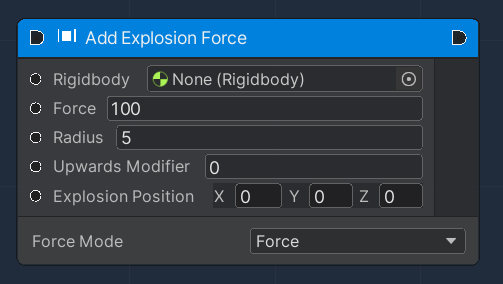
#### Add Explosion Force

This [OverNode](/over-sdk-manual/over-visual-scripting-legacy/visual-scripting-essentials/overnode.md) applies a force to a Rigidbody that simulates explosion effects.&#x20;

The explosion is modelled as a sphere with a certain centre position and radius in world space.

Force is applied along the direction of the `force` vector. Specifying the [ForceMode](https://docs.unity3d.com/ScriptReference/ForceMode.html) `mode` allows the type of force to be changed to an Acceleration, Impulse or Velocity Change.

This Flow [OverNode](/over-sdk-manual/over-visual-scripting-legacy/visual-scripting-essentials/overnode.md) accepts the following input data:

<table><thead><tr><th width="205.7659040188865">Name</th><th>Type</th><th width="340.1572968009442">Description</th></tr></thead><tbody><tr><td>Rigidbody</td><td><a href="https://docs.unity3d.com/ScriptReference/Rigidbody.html">Rigidbody</a></td><td>A reference of the input Unity Rigidbody Component</td></tr><tr><td>Force</td><td>Float</td><td>The force of the explosion</td></tr><tr><td>Force Mode</td><td><a href="https://docs.unity3d.com/ScriptReference/ForceMode.html">ForceMode</a></td><td>Used to specify how to apply a force</td></tr><tr><td>Radius</td><td>Float</td><td>Radius of the explosion</td></tr><tr><td>Upwards Modifier</td><td>Float</td><td>Adjustment to the apparent position of the explosion to make it seem to lift objects</td></tr></tbody></table>

<figure><img src="/files/2sBGUXQlZvVsnbN5fnao" alt=""><figcaption></figcaption></figure>

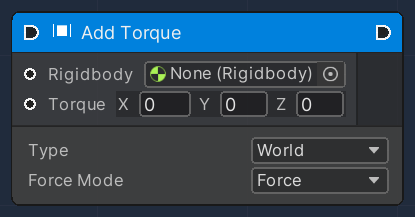
#### Add Torque

This [OverNode](/over-sdk-manual/over-visual-scripting-legacy/visual-scripting-essentials/overnode.md) adds torque to the Rigidbody.&#x20;

Force can be applied only to an active Rigidbody. If a GameObject is inactive, AddTorque has no effect.

The `Type` parameter allows for the application of the force relative to its coordinate system or not.

This Flow [OverNode](/over-sdk-manual/over-visual-scripting-legacy/visual-scripting-essentials/overnode.md) accepts the following input data:

<table><thead><tr><th width="205.7659040188865">Name</th><th>Type</th><th width="340.1572968009442">Description</th></tr></thead><tbody><tr><td>Rigidbody</td><td><a href="https://docs.unity3d.com/ScriptReference/Rigidbody.html">Rigidbody</a></td><td>A reference of the input Unity Rigidbody Component</td></tr><tr><td>Torque</td><td>Vector3</td><td>Vector describing the Torque to be applied</td></tr><tr><td>Force Mode</td><td><a href="https://docs.unity3d.com/ScriptReference/ForceMode.html">ForceMode</a></td><td>Used to specify how to apply a force</td></tr><tr><td>Type</td><td>Enum</td><td>Either World or Relative</td></tr></tbody></table>

<figure><img src="/files/sgtIZwoVq4KdFoFpFnyC" alt=""><figcaption></figcaption></figure>

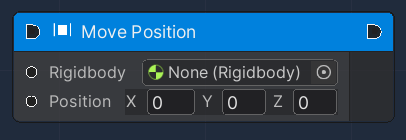
#### Move Position

This [OverNode](/over-sdk-manual/over-visual-scripting-legacy/visual-scripting-essentials/overnode.md) moves the kinematic Rigidbody towards a given position.&#x20;

This Flow [OverNode](/over-sdk-manual/over-visual-scripting-legacy/visual-scripting-essentials/overnode.md) accepts the following input data:

<table><thead><tr><th width="205.7659040188865">Name</th><th>Type</th><th width="340.1572968009442">Description</th></tr></thead><tbody><tr><td>Rigidbody</td><td><a href="https://docs.unity3d.com/ScriptReference/Rigidbody.html">Rigidbody</a></td><td>A reference of the input Unity Rigidbody Component</td></tr><tr><td>Position</td><td>Vector3</td><td>Provides the new position for the Rigidbody</td></tr></tbody></table>

<figure><img src="/files/E8EYj9E4viHbhInpMgmn" alt=""><figcaption></figcaption></figure>

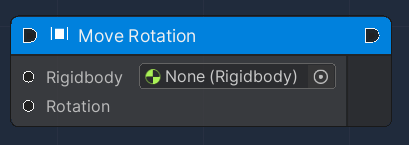
#### Move Rotation

This [OverNode](/over-sdk-manual/over-visual-scripting-legacy/visual-scripting-essentials/overnode.md) rotates the Rigidbody to rotation.&#x20;

This Flow [OverNode](/over-sdk-manual/over-visual-scripting-legacy/visual-scripting-essentials/overnode.md) accepts the following input data:

<table><thead><tr><th width="205.7659040188865">Name</th><th>Type</th><th width="340.1572968009442">Description</th></tr></thead><tbody><tr><td>Rigidbody</td><td><a href="https://docs.unity3d.com/ScriptReference/Rigidbody.html">Rigidbody</a></td><td>A reference of the input Unity Rigidbody Component</td></tr><tr><td>Rotation</td><td>Quaternion</td><td>The new rotation for the Rigidbody</td></tr></tbody></table>

<figure><img src="/files/UoodOTBGBGbdu3iVfogK" alt=""><figcaption></figcaption></figure>

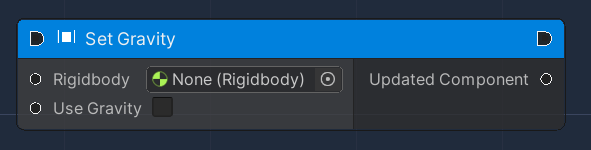
#### Set Gravity

This [OverNode](/over-sdk-manual/over-visual-scripting-legacy/visual-scripting-essentials/overnode.md) is used to modify an existing Rigibody Component, by setting its gravity flag. Once this flag is enabled, the Rigidbody will be affected by gravity, otherwise, it will behave as if in outer space.

This Flow [OverNode](/over-sdk-manual/over-visual-scripting-legacy/visual-scripting-essentials/overnode.md) accepts the following input data:

<table><thead><tr><th width="205.7659040188865">Name</th><th>Type</th><th width="340.1572968009442">Description</th></tr></thead><tbody><tr><td>Rigidbody </td><td><a href="https://docs.unity3d.com/ScriptReference/Rigidbody.html">Rigidbody</a></td><td>A reference of the input Unity Rigidbody Component</td></tr><tr><td>Use Gravity</td><td>Boolean</td><td>Gravity value</td></tr></tbody></table>

and produces the following output data:

<table><thead><tr><th width="186.7659040188865">Name</th><th width="207.3279424240331">Type</th><th width="340.1572968009442">Description</th></tr></thead><tbody><tr><td>Updated Component</td><td><a href="https://docs.unity3d.com/ScriptReference/Rigidbody.html">Rigidbody</a></td><td>A reference of the updated Unity Rigidbody Component</td></tr></tbody></table>

<figure><img src="/files/D5qv75YTScHgq1cLtVIE" alt=""><figcaption></figcaption></figure>

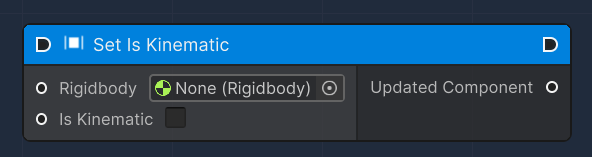
#### Set Is Kinematic

This [OverNode](/over-sdk-manual/over-visual-scripting-legacy/visual-scripting-essentials/overnode.md) is used to modify an existing Rigibody Component, by setting its isKinematic value.

&#x20;

<table><thead><tr><th width="186.7659040188865">Name</th><th width="207.3279424240331">Type</th><th width="340.1572968009442">Description</th></tr></thead><tbody><tr><td>Rigidbody</td><td><a href="https://docs.unity3d.com/ScriptReference/Rigidbody.html">Rigidbody</a></td><td>A reference of the input Unity Rigidbody Component</td></tr><tr><td>Is Kinematic</td><td>bool</td><td>IsKinematic value</td></tr><tr><td>Updated Component</td><td><a href="https://docs.unity3d.com/ScriptReference/Rigidbody.html">Rigidbody</a></td><td>A reference of the updated Unity Rigidbody Component</td></tr></tbody></table>

<figure><img src="/files/B6he5DKqCRCVxq2NlEGc" alt=""><figcaption></figcaption></figure>

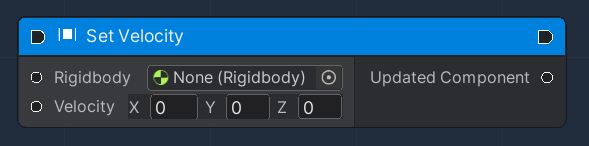
#### Set Velocity

This [OverNode](/over-sdk-manual/over-visual-scripting-legacy/visual-scripting-essentials/overnode.md) is used to modify an existing Rigibody Component, by setting its velocity.&#x20;

{% hint style="info" %}
In most cases, you should not modify the velocity directly, as this can result in unrealistic behaviour, except when a sudden change in velocity is needed for gameplay purposes.
{% endhint %}

This Flow [OverNode](/over-sdk-manual/over-visual-scripting-legacy/visual-scripting-essentials/overnode.md) accepts the following input data:

<table><thead><tr><th width="205.7659040188865">Name</th><th>Type</th><th width="340.1572968009442">Description</th></tr></thead><tbody><tr><td>Rigidbody </td><td><a href="https://docs.unity3d.com/ScriptReference/Rigidbody.html">Rigidbody</a></td><td>A reference of the input Unity Rigidbody Component</td></tr><tr><td>Velocity</td><td>Vector3</td><td>The velocity vector of the Rigidbody</td></tr></tbody></table>

and produces the following output data:

<table><thead><tr><th width="186.7659040188865">Name</th><th width="207.3279424240331">Type</th><th width="340.1572968009442">Description</th></tr></thead><tbody><tr><td>Updated Component</td><td><a href="https://docs.unity3d.com/ScriptReference/Rigidbody.html">Rigidbody</a></td><td>A reference of the updated Unity Rigidbody Component</td></tr></tbody></table>

<figure><img src="/files/yZuoE6p8ZxNmfQ6JXXmg" alt=""><figcaption></figcaption></figure>

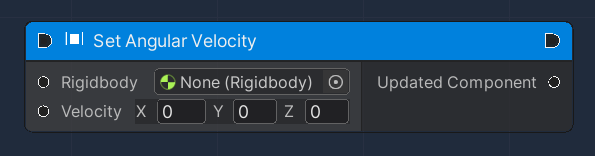
#### Set Angular Velocity

This [OverNode](/over-sdk-manual/over-visual-scripting-legacy/visual-scripting-essentials/overnode.md) is used to modify an existing Rigibody Component, by setting its angular velocity.&#x20;

{% hint style="info" %}
In most cases, you should not modify the angular velocity directly, as this can result in unrealistic behaviour, except when a sudden change in angular velocity is needed for gameplay purposes.
{% endhint %}

This Flow [OverNode](/over-sdk-manual/over-visual-scripting-legacy/visual-scripting-essentials/overnode.md) accepts the following input data:

<table><thead><tr><th width="205.7659040188865">Name</th><th>Type</th><th width="340.1572968009442">Description</th></tr></thead><tbody><tr><td>Rigidbody </td><td><a href="https://docs.unity3d.com/ScriptReference/Rigidbody.html">Rigidbody</a></td><td>A reference of the input Unity Rigidbody Component</td></tr><tr><td>Velocity</td><td>Vector3</td><td>The angular velocity vector of the Rigidbody</td></tr></tbody></table>

and produces the following output data:

<table><thead><tr><th width="186.7659040188865">Name</th><th width="207.3279424240331">Type</th><th width="340.1572968009442">Description</th></tr></thead><tbody><tr><td>Updated Component</td><td><a href="https://docs.unity3d.com/ScriptReference/Rigidbody.html">Rigidbody</a></td><td>A reference of the updated Unity Rigidbody Component</td></tr></tbody></table>

<figure><img src="/files/H5DqjPTw1CRXN0E85KjJ" alt=""><figcaption></figcaption></figure>


---

# Agent Instructions: Querying This Documentation

If you need additional information that is not directly available in this page, you can query the documentation dynamically by asking a question.

Perform an HTTP GET request on the current page URL with the `ask` query parameter:

```
GET https://docs.overthereality.ai/over-sdk-manual/over-visual-scripting-legacy/nodes/components/rigidbody.md?ask=<question>
```

The question should be specific, self-contained, and written in natural language.
The response will contain a direct answer to the question and relevant excerpts and sources from the documentation.

Use this mechanism when the answer is not explicitly present in the current page, you need clarification or additional context, or you want to retrieve related documentation sections.