# Trigger

### Description

This collection of [OverNode](/over-sdk-manual/over-visual-scripting-legacy/visual-scripting-essentials/overnode.md) represents all the nodes that interact with the physics Unity Trigger system.

GameObjects involved in the collision must contain a Collider component. One must have Collider.isTrigger enabled, and contain a Rigidbody. If both GameObjects have Collider.isTrigger enabled, no collision happens. The same applies when both GameObjects do not have a Rigidbody component.

#### Trigger Node

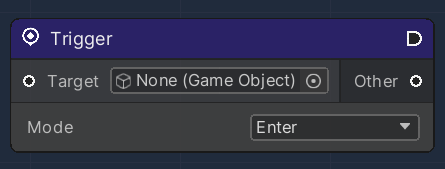
The main element of this system consists of a Trigger Node, that fires its execution on detecting a specific Trigger event.

Each Trigger Node must refer to a specific `Target` GameObject, accordingly equipped with a Unity3D [Collider](https://docs.unity3d.com/ScriptReference/Collider.html) Component.&#x20;

A `Mode` parameter can be selected in order to further customize the execution of the node, specifically:

<table><thead><tr><th width="204">Name</th><th>Description</th></tr></thead><tbody><tr><td>Enter</td><td>Sets the node to be executed when a physical object enters the Target Collider space</td></tr><tr><td>Stay</td><td>Sets the node to be executed when a physical object stays inside the Target Collider space</td></tr><tr><td>Exit</td><td>Sets the node to be executed when a physical object exits the Target Collider space</td></tr></tbody></table>

The Node also exposes some parameters:

<table><thead><tr><th width="205.7659040188865">Name</th><th width="194.3279424240331">Type</th><th width="340.1572968009442">Description</th></tr></thead><tbody><tr><td>Other</td><td><a href="https://docs.unity3d.com/ScriptReference/Collider.html">Collider</a></td><td>A reference of the input Unity3D Collider Component of the object colliding with the Target</td></tr></tbody></table>

<figure><img src="/files/Q6fyVP9PkZtdqVq4zQlH" alt=""><figcaption></figcaption></figure>

#### OverTriggerListener

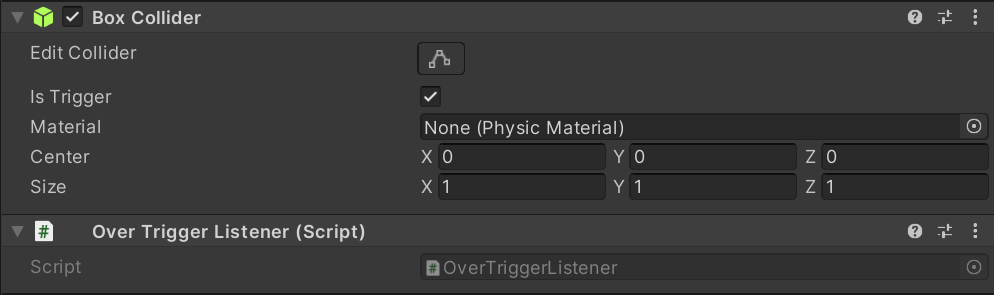
For the Node system to communicate to the Unity3D Runtime environment, an OverTriggerListener component must be associated with the Target GameObject.&#x20;

Its main function is to provide a bridge between the node system and the UnityEngine event system, which handles trigger events automatically.

<figure><img src="/files/7qX85vIydaU1d125julh" alt=""><figcaption></figcaption></figure>

#### Trigger Lazy Load

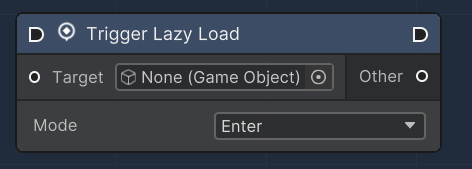
The "Trigger Lazy Load" node is designed to register a trigger event on a GameObject. When the GameObject's collider interacts with another collider in a specified mode (Enter, Exit, Stay), the node triggers an event.

| Property | Type            | Description                                                                                          |
| -------- | --------------- | ---------------------------------------------------------------------------------------------------- |
| Target   | GameObject      | The input slot for the GameObject which is monitored for trigger events.                             |
| Other    | Collider        | The output slot that will output the Collider that interacted with the target GameObject's Collider. |
| Mode     | Enum (Dropdown) | A dropdown menu that allows selection of the trigger interaction mode: Enter, Exit, or Stay.         |

<figure><img src="/files/e3IRN8PCzrvgZy4AMc3n" alt=""><figcaption></figcaption></figure>


---

# Agent Instructions: Querying This Documentation

If you need additional information that is not directly available in this page, you can query the documentation dynamically by asking a question.

Perform an HTTP GET request on the current page URL with the `ask` query parameter:

```
GET https://docs.overthereality.ai/over-sdk-manual/over-visual-scripting-legacy/nodes/flow/other-events/trigger.md?ask=<question>
```

The question should be specific, self-contained, and written in natural language.
The response will contain a direct answer to the question and relevant excerpts and sources from the documentation.

Use this mechanism when the answer is not explicitly present in the current page, you need clarification or additional context, or you want to retrieve related documentation sections.