> For the complete documentation index, see [llms.txt](https://docs.overthereality.ai/over-sdk-manual/llms.txt). Markdown versions of documentation pages are available by appending `.md` to page URLs; this page is available as [Markdown](https://docs.overthereality.ai/over-sdk-manual/over-visual-scripting-legacy/nodes/operations/math.md).

# Math

### Description

The Math nodes provide several operations, specifically used for evaluating simple mathematical tasks.

#### Unary&#x20;

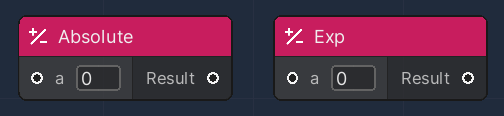
These nodes accept only one numerical parameter, to produce a numerical result.

<table><thead><tr><th width="204">Node</th><th>Description</th></tr></thead><tbody><tr><td>Absolute</td><td>Returns the absolute value of the input</td></tr><tr><td>Exp</td><td>Returns the value of the exponential function, where the input value is used as exponent</td></tr></tbody></table>

<figure><img src="/files/kHEWmzIg99mtJd2eWtsl" alt=""><figcaption></figcaption></figure>

#### Binary

These nodes accept two numerical parameters, to produce a numerical result.

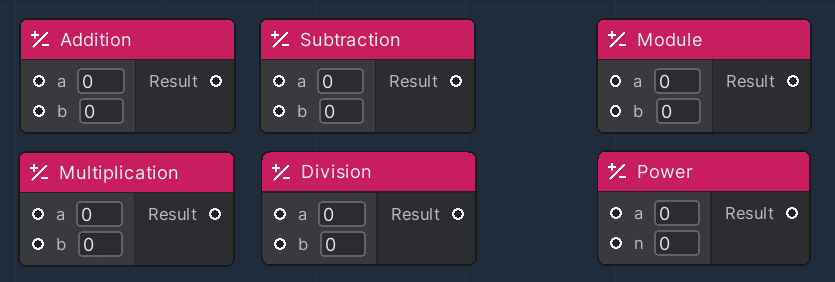
<table><thead><tr><th width="204">Node</th><th>Description</th></tr></thead><tbody><tr><td>Addition</td><td>Returns the sum of the inputs</td></tr><tr><td>Subtraction</td><td>Returns the value of the first input minus the second</td></tr><tr><td>Multiplication</td><td>Returns the multiplication result of the inputs</td></tr><tr><td>Division</td><td>Returns the division of the first and the second input</td></tr><tr><td>Module</td><td>Returns the module between the first and the second input</td></tr><tr><td>Power</td><td>Returns the value of the power function, where the first input is the base and the second input value is used as the exponent</td></tr></tbody></table>

<figure><img src="/files/QRTeOOs9eckCoZGf3Ayt" alt=""><figcaption></figcaption></figure>

#### Clamp

These nodes are used to clamp the value of given numerical values, to give them an approximation.

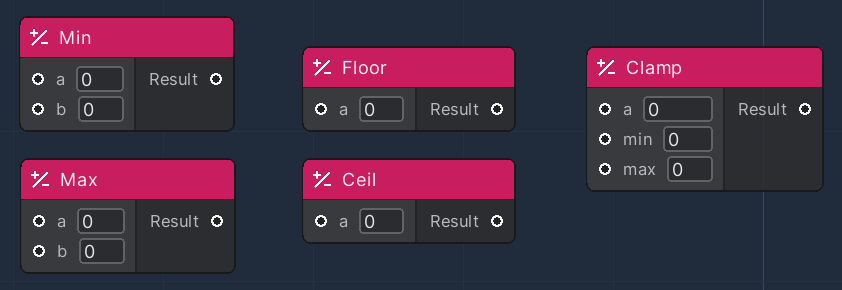
<table><thead><tr><th width="204">Node</th><th>Description</th></tr></thead><tbody><tr><td>Min</td><td>Returns the lesser value between two inputs</td></tr><tr><td>Max</td><td>Returns the greater value between two inputs</td></tr><tr><td>Floor</td><td>Returns the closest integer value, less than the input provided</td></tr><tr><td>Ceil</td><td>Returns the closest integer value, greater than the input provided</td></tr><tr><td>Clamp</td><td>Returns the value between a given minimum and maximum values. Returns the given input as is, if it is within the minimum and maximum range</td></tr></tbody></table>

<figure><img src="/files/Wsz8vogrwmAhiIaXqQSc" alt=""><figcaption></figcaption></figure>

#### Trigonometry

These nodes are used to implement simple operations involving angles.

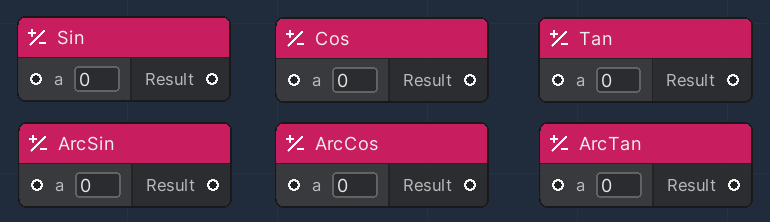
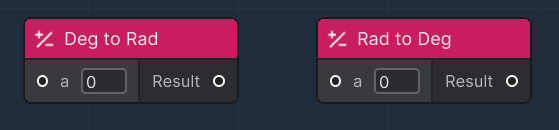
<table><thead><tr><th width="204">Node</th><th>Description</th></tr></thead><tbody><tr><td>Sin</td><td>Returns the sin value of the given input</td></tr><tr><td>Cos</td><td>Returns the cos value of the given input</td></tr><tr><td>Tan</td><td>Returns the tan value of the given input</td></tr><tr><td>ArcSin</td><td>Returns the arcsin value of the given input</td></tr><tr><td>ArcCos</td><td>Returns the arccos value of the given input</td></tr><tr><td>ArcTan</td><td>Returns the arctan value of the given input</td></tr><tr><td>Deg to Rad</td><td>Return the value converted to radiants</td></tr><tr><td>Rad to Deg</td><td>Return the value converted to Degrees</td></tr></tbody></table>

<figure><img src="/files/7HdoCIeS4KsaxDvhFV5h" alt=""><figcaption></figcaption></figure>

<figure><img src="/files/4Vg21FwwQABcCcZt8rZI" alt=""><figcaption></figcaption></figure>

#### Random

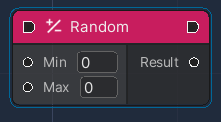
This node is used to generate new random numbers in an inclusive range, from a min to a max value.

To ensure a single Random number is generated at a given time, this [OverNode ](/over-sdk-manual/over-visual-scripting-legacy/visual-scripting-essentials/overnode.md)needs to be part of an execution flow.

<figure><img src="/files/4NWykukUkPpwZ4FAOw7u" alt=""><figcaption></figcaption></figure>

#### Utils

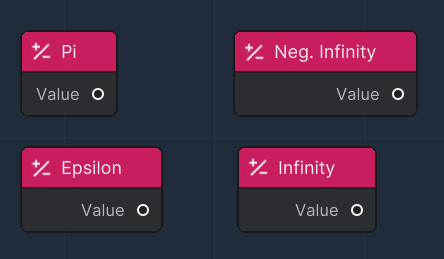
Those nodes are used just to get easily the well-known constant values

<figure><img src="/files/nKOlb5QmAAyJIRukyQnh" alt=""><figcaption></figcaption></figure>

<table><thead><tr><th width="204">Node</th><th>Description</th></tr></thead><tbody><tr><td>Pi</td><td>Returns the Pie value</td></tr><tr><td>Epsilon</td><td>Returns a tiny floating point value</td></tr><tr><td>Infinity</td><td>Returns a rapresentation of positive infinity</td></tr><tr><td>Neg. Infinity</td><td>Returns a representation of negative infinity</td></tr></tbody></table>


---

# Agent Instructions
This documentation is published with GitBook. GitBook is the documentation platform designed so that both humans and AI agents can read, navigate, and reason over technical content effectively. Learn more at gitbook.com.

## Querying This Documentation
If you need additional information that is not directly available in this page, you can query the documentation dynamically by asking a question.

Perform an HTTP GET request on the current page URL with the `ask` query parameter, and the optional `goal` query parameter:

```
GET https://docs.overthereality.ai/over-sdk-manual/over-visual-scripting-legacy/nodes/operations/math.md?ask=<question>&goal=<endgoal>
```

`ask` is the immediate question: it should be specific, self-contained, and written in natural language.
`goal` is optional and describes the broader end goal you are ultimately trying to accomplish on behalf of the user. GitBook uses it to tailor the answer towards what is most useful for that goal.

The response will contain a direct answer to the question and relevant excerpts and sources from the documentation.

Use this mechanism when the answer is not explicitly present in the current page, you need clarification or additional context, or you want to retrieve related documentation sections.