> For the complete documentation index, see [llms.txt](https://docs.overthereality.ai/over-sdk-manual/llms.txt). Markdown versions of documentation pages are available by appending `.md` to page URLs; this page is available as [Markdown](https://docs.overthereality.ai/over-sdk-manual/over-visual-scripting-legacy/nodes/operations/saving-system.md).

# Saving System

### Description

This collection of [OverNode](/over-sdk-manual/over-visual-scripting-legacy/visual-scripting-essentials/overnode.md) represents some primitive operations used to store some simple data locally, later to be used.

#### Has Saved Value

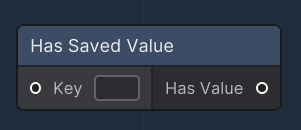
<figure><img src="/files/mjmClAt5gaaLHn7nHgFY" alt=""><figcaption><p>Has Saved Value node</p></figcaption></figure>

The "Has Saved Value" node is used to check if a certain key has an associated value in the saved data. This node is typically connected to a local save file and it takes a key as input and outputs a boolean indicating whether the value for that key exists. This can be particularly useful to check for saved settings, player progress, or any other persistently stored value.

<table><thead><tr><th>Name</th><th width="179.2246866720682">Type</th><th width="340.1572968009442">Description</th></tr></thead><tbody><tr><td>Key</td><td>string</td><td>An input slot for the key whose presence in the saved data is to be checked.</td></tr><tr><td>Has Value</td><td>bool</td><td>An output slot that provides a boolean result; true if the key has an associated saved value, false otherwise.</td></tr></tbody></table>

#### Save Value

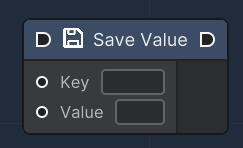
<figure><img src="/files/22zCKj5Q5YS0Rvr6PwIl" alt=""><figcaption><p>Save Value node</p></figcaption></figure>

The "Save Value" node is utilized to store a key-value pair locally. It receives a key and a value as inputs and attempts to save this data. If successful, the data is stored and can be retrieved later, even after the application has been closed and reopened. This node is critical for creating save systems, storing user preferences, or keeping track of game states.

<table><thead><tr><th>Name</th><th width="179.2246866720682">Type</th><th width="340.1572968009442">Description</th></tr></thead><tbody><tr><td>Key</td><td>string</td><td>An input slot for the key under which the value will be saved.</td></tr><tr><td>Value</td><td>string</td><td>An input slot for the value to be saved in association with the specified key.</td></tr></tbody></table>

#### Get Saved Value

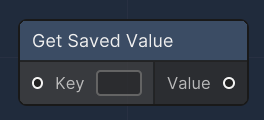
<figure><img src="/files/X6XPvLaSFLCmPo5knze0" alt=""><figcaption><p>Get Saved Value node</p></figcaption></figure>

The "Get Saved Value" node retrieves the value associated with a specified key from a local storage This node is essential for accessing saved data such as user settings, game progress, or preferences. If the key exists in storage, the node outputs the corresponding value as a string. If not, an error is logged indicating the key was not found.

<table><thead><tr><th>Name</th><th width="179.2246866720682">Type</th><th width="340.1572968009442">Description</th></tr></thead><tbody><tr><td>Key</td><td>string</td><td>An input slot for the key whose value is to be retrieved from the saved data.</td></tr><tr><td>Value</td><td>string</td><td>An output slot that provides the value retrieved from the persistent storage for the given key. If the key does not exist, the output will be null.</td></tr></tbody></table>


---

# Agent Instructions
This documentation is published with GitBook. GitBook is the documentation platform designed so that both humans and AI agents can read, navigate, and reason over technical content effectively. Learn more at gitbook.com.

## Querying This Documentation
If you need additional information that is not directly available in this page, you can query the documentation dynamically by asking a question.

Perform an HTTP GET request on the current page URL with the `ask` query parameter, and the optional `goal` query parameter:

```
GET https://docs.overthereality.ai/over-sdk-manual/over-visual-scripting-legacy/nodes/operations/saving-system.md?ask=<question>&goal=<endgoal>
```

`ask` is the immediate question: it should be specific, self-contained, and written in natural language.
`goal` is optional and describes the broader end goal you are ultimately trying to accomplish on behalf of the user. GitBook uses it to tailor the answer towards what is most useful for that goal.

The response will contain a direct answer to the question and relevant excerpts and sources from the documentation.

Use this mechanism when the answer is not explicitly present in the current page, you need clarification or additional context, or you want to retrieve related documentation sections.