> For the complete documentation index, see [llms.txt](https://docs.overthereality.ai/over-sdk-manual/llms.txt). Markdown versions of documentation pages are available by appending `.md` to page URLs; this page is available as [Markdown](https://docs.overthereality.ai/over-sdk-manual/over-visual-scripting-legacy/nodes/operations/web.md).

# Web

### Description

The following [OverNode](/over-sdk-manual/over-visual-scripting-legacy/visual-scripting-essentials/overnode.md) are used to interact with the web.

#### Open Url

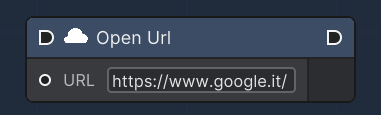
<figure><img src="/files/47TJZErvnTk7mpsL9FIx" alt=""><figcaption><p>Open Url node</p></figcaption></figure>

This node allows users to open URLs to external resources, such as web pages.<br>

<table><thead><tr><th>Name</th><th width="179.2246866720682">Type</th><th width="340.1572968009442">Description</th></tr></thead><tbody><tr><td>Url</td><td>String</td><td>Url pointing to a specific resource.</td></tr></tbody></table>

#### Web Request

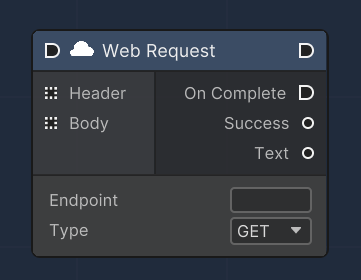
<figure><img src="/files/vfszqyxFkQYtvzSiyN8E" alt=""><figcaption><p>Web request node</p></figcaption></figure>

The "Web Request" node is designed to send HTTP requests from within the Unity environment. It supports GET and POST methods, allowing for data retrieval and submission to web services. Headers and body parameters can be specified, and the node outputs the success status of the request as well as the response text in JSON format. An execution flow is triggered upon completion of the web request, facilitating asynchronous operations and handling of the response data.

<table><thead><tr><th width="134.95627835682686">Name</th><th width="271.2246866720682">Type</th><th width="340.1572968009442">Description</th></tr></thead><tbody><tr><td>Header</td><td>Dictionary&#x3C;string, string></td><td>Allows for the input of request headers as key-value pairs, which can modify the HTTP request sent.</td></tr><tr><td>Body</td><td>Dictionary&#x3C;string, string></td><td>Used for inputting parameters for the request, which can be used in the query string of a GET request or the body of a POST request.</td></tr><tr><td>On Complete</td><td><a href="/pages/cZKe90OnIb44J4lRUDBS">OverExecutionFlowData</a></td><td>An execution output that triggers the next node in the flow once the web request is completed.</td></tr><tr><td>Success</td><td>bool</td><td>An output that indicates whether the web request was successful (true) or encountered an error (false).</td></tr><tr><td>Text</td><td>JSONNode</td><td>An output that provides the response text from the web request, parsed as a JSON node for easy access to data.</td></tr><tr><td>Endpoint</td><td>string</td><td>An editable field where the endpoint URL for the web request is specified.</td></tr><tr><td>Type</td><td>enum</td><td>A selectable dropdown that allows the selection of the HTTP method for the request, either GET or POST.</td></tr></tbody></table>

#### Form Field

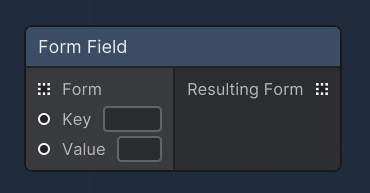
<figure><img src="/files/4kPa2c7gtRU7WabYESmU" alt=""><figcaption><p>Form Field node</p></figcaption></figure>

The "Form Field" node is utilized to construct or modify form data within a web request. It allows for the addition or updating of key-value pairs in a form, which can be sent as part of an HTTP POST request. This node can be used standalone to create a single form field or chained with other "Form Field" nodes to construct more complex forms. It is particularly useful when combined with the "Web Request" node to dynamically build the body of an HTTP request.

<table><thead><tr><th width="134.95627835682686">Name</th><th width="271.2246866720682">Type</th><th width="340.1572968009442">Description</th></tr></thead><tbody><tr><td>Form</td><td>Dictionary&#x3C;string, string></td><td>An input slot that takes an existing form as a dictionary to which a new key-value pair will be added or an existing key will be updated.</td></tr><tr><td>Key</td><td>string</td><td>An input slot for the key of the form field. This defines the name of the form element.</td></tr><tr><td>Value</td><td>string</td><td>An input slot for the value of the form field. This is the data or content associated with the key.</td></tr><tr><td>Resulting Form</td><td>Dictionary&#x3C;string, string></td><td>An output slot that provides the resulting form with the new or updated key-value pair. It can be connected to other nodes to further build upon the form data.</td></tr></tbody></table>


---

# Agent Instructions
This documentation is published with GitBook. GitBook is the documentation platform designed so that both humans and AI agents can read, navigate, and reason over technical content effectively. Learn more at gitbook.com.

## Querying This Documentation
If you need additional information that is not directly available in this page, you can query the documentation dynamically by asking a question.

Perform an HTTP GET request on the current page URL with the `ask` query parameter, and the optional `goal` query parameter:

```
GET https://docs.overthereality.ai/over-sdk-manual/over-visual-scripting-legacy/nodes/operations/web.md?ask=<question>&goal=<endgoal>
```

`ask` is the immediate question: it should be specific, self-contained, and written in natural language.
`goal` is optional and describes the broader end goal you are ultimately trying to accomplish on behalf of the user. GitBook uses it to tailor the answer towards what is most useful for that goal.

The response will contain a direct answer to the question and relevant excerpts and sources from the documentation.

Use this mechanism when the answer is not explicitly present in the current page, you need clarification or additional context, or you want to retrieve related documentation sections.