> For the complete documentation index, see [llms.txt](https://docs.overthereality.ai/over-sdk-manual/llms.txt). Markdown versions of documentation pages are available by appending `.md` to page URLs; this page is available as [Markdown](https://docs.overthereality.ai/over-sdk-manual/over-visual-scripting-legacy/nodes/variables.md).
# Variables
### Description
Variables are, by definition, data structures holding a specific value that can be edited during runtime.
Each variable is defined by its name, type, and scope inside [OverScriptManager](/over-sdk-manual/over-visual-scripting-legacy/visual-scripting-essentials/overscriptmanager.md) and [OverScript](/over-sdk-manual/over-visual-scripting-legacy/visual-scripting-essentials/overscript.md).
In general, variables can be distinguished into two main categories:
* **GLOBAL**: Variables having the widest scope possible, that can be accessed by every script in a Scene. [OverScriptManager](/over-sdk-manual/over-visual-scripting-legacy/visual-scripting-essentials/overscriptmanager.md) is responsible for handling global variables and it is the only place in which they can be defined
* **LOCAL**: Variables that have their scope limited only to a specific [OverScript](/over-sdk-manual/over-visual-scripting-legacy/visual-scripting-essentials/overscript.md), in which they are defined and reside. Local variables cannot be referenced by a different script.
#### Handling variables
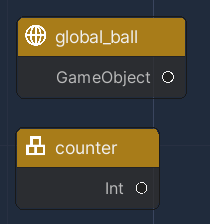
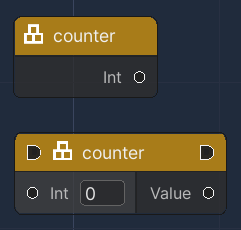
Once a variable is correctly defined, a variable is listed in the Graph. A variable can be presented in two kinds of nodes, depending on its usage:
* **GET Node**: a Plain Node whose purpose is to deliver the current value of the variable.
* **SET Node**: a Flow Node whose purpose is to edit the value of the variable.
A variable may be defined for any type of object. It is therefore possible, thanks to variables, to interact with any component associated with objects in the scene.