> For the complete documentation index, see [llms.txt](https://docs.overthereality.ai/over-sdk-manual/llms.txt). Markdown versions of documentation pages are available by appending `.md` to page URLs; this page is available as [Markdown](https://docs.overthereality.ai/over-sdk-manual/over-visual-scripting-legacy/nodes/operations/json.md).

# JSON

### Description

The following [OverNode](/over-sdk-manual/over-visual-scripting-legacy/visual-scripting-essentials/overnode.md) are used to manage [JSON](https://it.wikipedia.org/wiki/JavaScript_Object_Notation) data.

{% hint style="info" %}
**Note**: To read the [JSONNode](https://docs.unity3d.com/Packages/com.unity.systemgraph@2.0/api/SimpleJSON.JSONNode.html) value you must convert it into a string using the node [ToString](/over-sdk-manual/over-visual-scripting-legacy/nodes/operations/string.md).
{% endhint %}

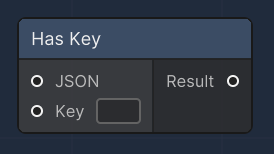
#### Has Key

<figure><img src="/files/9iDUO0N9pDG7jhijywWQ" alt=""><figcaption><p>Open Url node</p></figcaption></figure>

The "Has Key" node checks if a specified key exists within a JSON object. It takes a JSONNode and a string key as inputs and returns a boolean result. This node is particularly useful in parsing JSON data, allowing the user to verify the presence of data before attempting to access it, thus avoiding potential errors in the data handling process.<br>

<table><thead><tr><th>Name</th><th width="179.2246866720682">Type</th><th width="340.1572968009442">Description</th></tr></thead><tbody><tr><td>JSON</td><td>JSONNode</td><td>An input slot for the JSON object in which the presence of the key will be checked.</td></tr><tr><td>Key</td><td>string</td><td>An input slot for the key to be checked within the JSON object.</td></tr><tr><td>Result</td><td>bool</td><td>An output slot that provides the result of the check; true if the key exists, otherwise false.</td></tr></tbody></table>

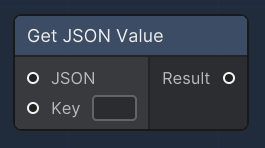
#### Get JSON Value

<figure><img src="/files/5E80ODr9brDQSsLUFUAG" alt=""><figcaption><p>Web request node</p></figcaption></figure>

The "Get JSON Value" node is designed to retrieve a value from a JSON object using a specified key. It accepts a JSONNode and a key as inputs and outputs the corresponding value as a JSONNode. If the key does not exist within the JSON object, a warning is logged, and the node outputs null. This node is essential for extracting specific pieces of data from JSON structures, particularly when handling responses from web services or parsing JSON data files.

<table><thead><tr><th width="134.95627835682686">Name</th><th width="271.2246866720682">Type</th><th width="340.1572968009442">Description</th></tr></thead><tbody><tr><td>JSON</td><td>JSONNode</td><td>An input slot that receives the JSON object from which the value will be extracted.</td></tr><tr><td>Key</td><td>string</td><td>An input slot for the key corresponding to the value to be retrieved from the JSON object.</td></tr><tr><td>Result</td><td>JSONNode</td><td>An output slot that provides the value associated with the input key from the JSON object, or null if the key is not present.</td></tr></tbody></table>

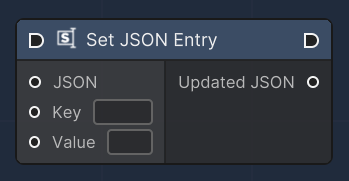
#### Set JSON Entry

<figure><img src="/files/BJqsr0RxofhHtmV9d3Ut" alt=""><figcaption><p>Form Field node</p></figcaption></figure>

The "Set JSON Entry" node is used to modify or add a new key-value pair to a JSON object. It accepts a JSONNode, a key, and a value as inputs. The node updates the JSON object with the new value for the specified key or adds the key-value pair if the key does not exist. The result is an updated JSON object. This operation is fundamental when manipulating JSON structures, such as configuring settings, updating data, or preparing payloads for web requests.

<table><thead><tr><th width="134.95627835682686">Name</th><th width="271.2246866720682">Type</th><th width="340.1572968009442">Description</th></tr></thead><tbody><tr><td>JSON</td><td>JSONNode</td><td>An input slot for the JSON object to be modified or added to.</td></tr><tr><td>Key</td><td>string</td><td>An input slot for the key of the JSON entry to set or update.</td></tr><tr><td>Value</td><td>string</td><td>An input slot for the value to be associated with the specified key in the JSON object.</td></tr><tr><td>Updated JSON</td><td>JSONNode</td><td>An output slot that provides the JSON object after the key-value pair has been set or updated.</td></tr></tbody></table>


---

# Agent Instructions
This documentation is published with GitBook. GitBook is the documentation platform designed so that both humans and AI agents can read, navigate, and reason over technical content effectively. Learn more at gitbook.com.

## Querying This Documentation
If you need additional information that is not directly available in this page, you can query the documentation dynamically by asking a question.

Perform an HTTP GET request on the current page URL with the `ask` query parameter, and the optional `goal` query parameter:

```
GET https://docs.overthereality.ai/over-sdk-manual/over-visual-scripting-legacy/nodes/operations/json.md?ask=<question>&goal=<endgoal>
```

`ask` is the immediate question: it should be specific, self-contained, and written in natural language.
`goal` is optional and describes the broader end goal you are ultimately trying to accomplish on behalf of the user. GitBook uses it to tailor the answer towards what is most useful for that goal.

The response will contain a direct answer to the question and relevant excerpts and sources from the documentation.

Use this mechanism when the answer is not explicitly present in the current page, you need clarification or additional context, or you want to retrieve related documentation sections.