# Object

### Description

An Object [OverNode](/over-sdk-manual/over-visual-scripting-legacy/visual-scripting-essentials/overnode.md) is used to handle base objects in the Scene, by interacting with the Unity [GameObject](https://docs.unity3d.com/ScriptReference/GameObject.html).

#### Object Exposer

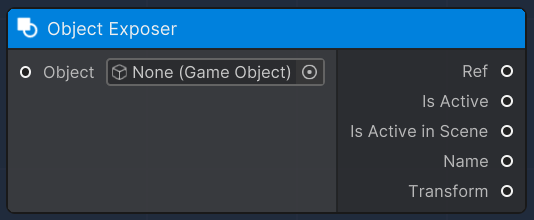
This [OverNode](/over-sdk-manual/over-visual-scripting-legacy/visual-scripting-essentials/overnode.md) is used to expose certain parameters and attributes of a given input Unity 3D [GameObject](https://docs.unity3d.com/ScriptReference/GameObject.html), which are:

<table><thead><tr><th>Name</th><th width="204.3279424240331">Type</th><th width="340.1572968009442">Description</th></tr></thead><tbody><tr><td>Ref</td><td><a href="https://docs.unity3d.com/ScriptReference/GameObject.html">GameObject</a></td><td>A reference of the input Unity GameObject</td></tr><tr><td>Name</td><td>String</td><td>Name of the GameObject</td></tr><tr><td>Transform</td><td><a href="https://docs.unity3d.com/ScriptReference/Transform.html">Transform</a></td><td>Transform component associated to the object in Scene</td></tr><tr><td>Is Active</td><td>Boolean</td><td>The local active state of the GameObject</td></tr><tr><td>Is Active in Scene</td><td>Boolean</td><td>Defines whether the GameObject is active in Scene</td></tr></tbody></table>

<figure><img src="/files/bjd1nT3N75kyDTCMudw2" alt=""><figcaption></figcaption></figure>

#### Set Active

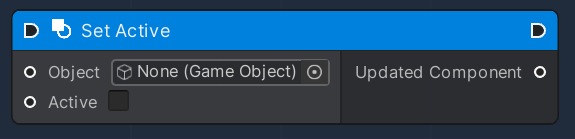
This node is used to modify an existing GameObject, by setting its Active state.

This Flow Node accepts the following input data:

<table><thead><tr><th width="205.7659040188865">Name</th><th>Type</th><th width="340.1572968009442">Description</th></tr></thead><tbody><tr><td>Object</td><td><a href="https://docs.unity3d.com/ScriptReference/GameObject.html">GameObject</a></td><td>A reference of the input Unity GameObject</td></tr><tr><td>Active</td><td>Boolean</td><td>New Active state</td></tr></tbody></table>

and produces the following output data:

<table><thead><tr><th width="186.7659040188865">Name</th><th width="207.3279424240331">Type</th><th width="340.1572968009442">Description</th></tr></thead><tbody><tr><td>Output</td><td><a href="https://docs.unity3d.com/ScriptReference/GameObject.html">GameObject</a></td><td>A reference of the modified Unity GameObject</td></tr></tbody></table>

<figure><img src="/files/Qpyo5MBizsyPkuNbNycg" alt=""><figcaption></figcaption></figure>

#### Create (Instantiate from SDK 0.1.6+)

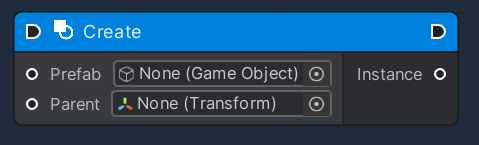
This [OverNode](/over-sdk-manual/over-visual-scripting-legacy/visual-scripting-essentials/overnode.md) allows the creation of a new instance, of a given GameObject, in Scene (similar to Unity's [Instantiate ](https://docs.overthereality.ai/over-avatar-body-standard-for-clothes)functionality).

This Flow [OverNode](/over-sdk-manual/over-visual-scripting-legacy/visual-scripting-essentials/overnode.md) accepts the following input data:

<table><thead><tr><th width="205.7659040188865">Name</th><th width="196.3279424240331">Type</th><th width="340.1572968009442">Description</th></tr></thead><tbody><tr><td>Prefab</td><td><a href="https://docs.unity3d.com/ScriptReference/GameObject.html">GameObject</a></td><td>The original GameObject </td></tr><tr><td>Parent</td><td><a href="https://docs.unity3d.com/ScriptReference/Transform.html">Transform</a></td><td>Transform Component, yet to be the parent of the new instantiated object</td></tr></tbody></table>

and produces the following output data:

<table><thead><tr><th width="186.7659040188865">Name</th><th width="207.3279424240331">Type</th><th width="340.1572968009442">Description</th></tr></thead><tbody><tr><td>Instance</td><td><a href="https://docs.unity3d.com/ScriptReference/GameObject.html">GameObject</a></td><td>A reference of the newly instantiated Unity GameObject</td></tr></tbody></table>

<figure><img src="/files/7TmhLDEAy9ZEt4r9fJIt" alt=""><figcaption></figcaption></figure>

#### Destroy

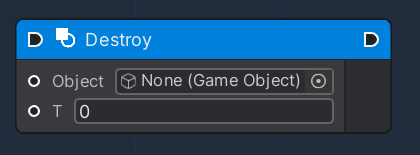
This [OverNode](/over-sdk-manual/over-visual-scripting-legacy/visual-scripting-essentials/overnode.md) allows the destruction of a given GameObject in Scene, with all of its subcomponents.&#x20;

This Flow [OverNode](/over-sdk-manual/over-visual-scripting-legacy/visual-scripting-essentials/overnode.md) accepts the following input data:

<table><thead><tr><th width="205.7659040188865">Name</th><th width="196.3279424240331">Type</th><th width="340.1572968009442">Description</th></tr></thead><tbody><tr><td>Object</td><td><a href="https://docs.unity3d.com/ScriptReference/GameObject.html">GameObject</a></td><td>The GameObject to be destroyed</td></tr><tr><td>T</td><td>Float</td><td>Time delay for destruction</td></tr></tbody></table>

<figure><img src="/files/JYi5bjQCu0Lg0EauNZVi" alt=""><figcaption></figcaption></figure>

#### Compare Name

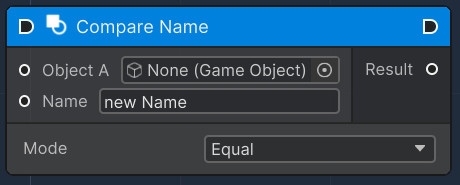
This [OverNode](/over-sdk-manual/over-visual-scripting-legacy/visual-scripting-essentials/overnode.md) allows you to compare the name of a given GameObject to a specific String.

This Flow [OverNode](/over-sdk-manual/over-visual-scripting-legacy/visual-scripting-essentials/overnode.md) accepts the following input data:

<table><thead><tr><th width="205.7659040188865">Name</th><th width="196.3279424240331">Type</th><th width="340.1572968009442">Description</th></tr></thead><tbody><tr><td>Object A</td><td><a href="https://docs.unity3d.com/ScriptReference/GameObject.html">GameObject</a></td><td>The GameObject to compare</td></tr><tr><td>Name</td><td>String</td><td>String to compare the GameObject to</td></tr><tr><td>Mode</td><td>Enum</td><td>Mode of comparifon (Equal or NotEqual)</td></tr></tbody></table>

<figure><img src="/files/64bnpD2GUrW2In59fSwB" alt=""><figcaption></figcaption></figure>

#### Get Component

<figure><img src="/files/GXSiKmbeQ3vqgZ4sRJhP" alt=""><figcaption></figcaption></figure>

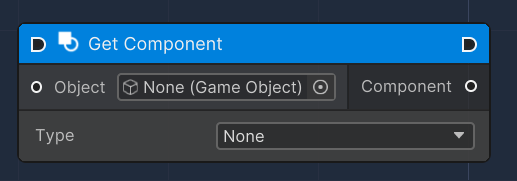
The "Get Component" node is used to retrieve a specific type of component from a GameObject in Unity. The node has an input for the GameObject from which the component is to be retrieved and outputs the specified component if it exists on the GameObject. The type of component to retrieve can be specified from a dropdown menu of available component types.

| Property  | Type            | Description                                                                                                                                                |
| --------- | --------------- | ---------------------------------------------------------------------------------------------------------------------------------------------------------- |
| Object    | GameObject      | The input slot for the GameObject from which to retrieve the component.                                                                                    |
| Component | Component       | The output slot that will output the specified component from the GameObject. This can be of multiple types depending on the selected `OverComponentType`. |
| Type      | Enum (Dropdown) | A dropdown menu that allows selection of the type of component to retrieve from the GameObject.                                                            |


---

# Agent Instructions: Querying This Documentation

If you need additional information that is not directly available in this page, you can query the documentation dynamically by asking a question.

Perform an HTTP GET request on the current page URL with the `ask` query parameter:

```
GET https://docs.overthereality.ai/over-sdk-manual/over-visual-scripting-legacy/nodes/components/object.md?ask=<question>
```

The question should be specific, self-contained, and written in natural language.
The response will contain a direct answer to the question and relevant excerpts and sources from the documentation.

Use this mechanism when the answer is not explicitly present in the current page, you need clarification or additional context, or you want to retrieve related documentation sections.